Real-time Email Tracking & Analytics Inside Airtable
Creating & sending an interactive marketing email is just one part of your job, the real task is to analyze clicks, bounce and unsubscribe rates, as this turns your analyzing into a life-time improvement strategy.
The email tracking & analytics in Airtable can give you the full visibility of every email sent, with the results directly written back into your Airtable base. With BaseMailer, you don’t need a separate analytics tool, as your email data remains inside the base right next to the context, deals and records your whole team have already worked with it.
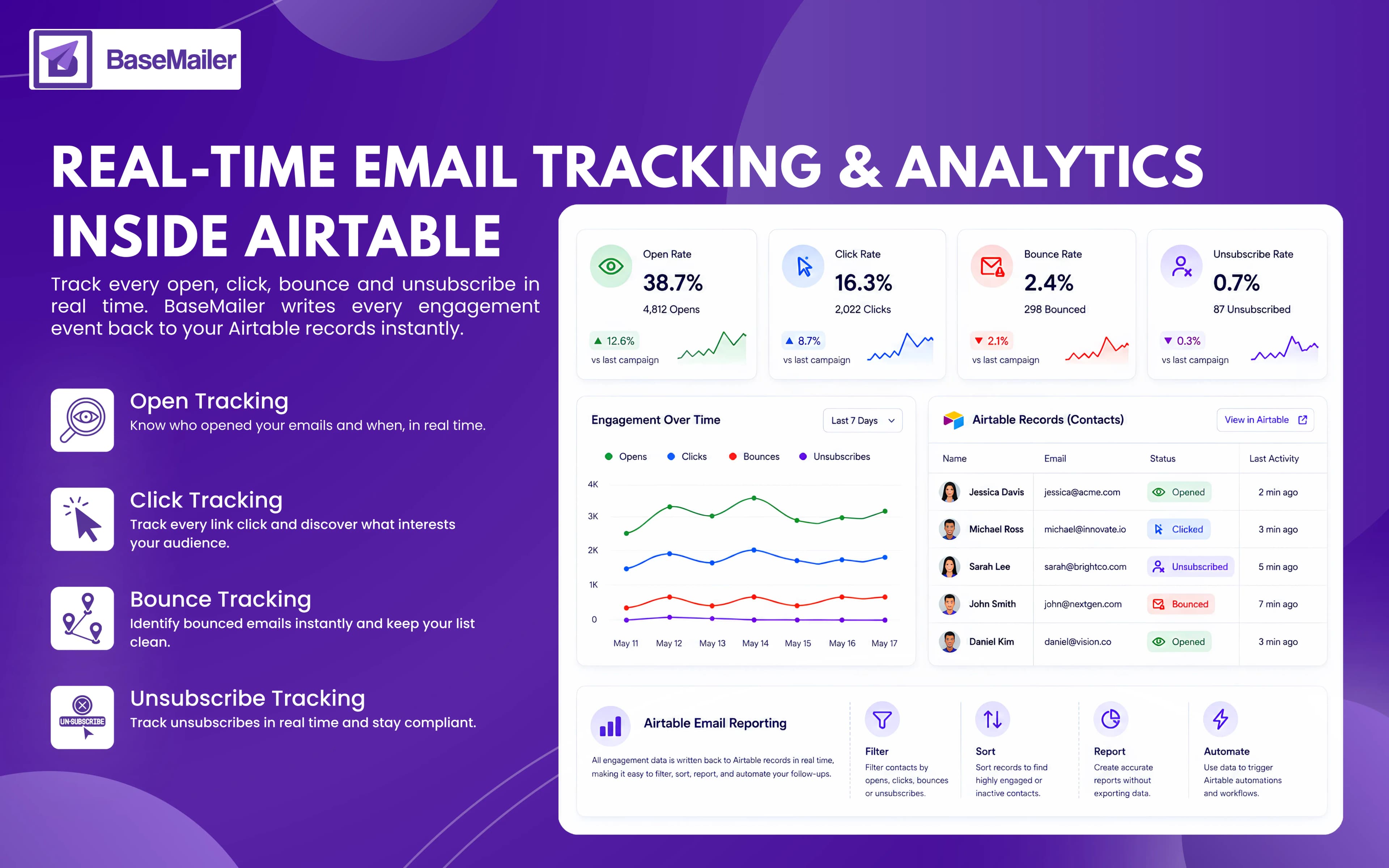
What Is Email Tracking & Analytics For Airtable?
Real-time email tracking & analytics for Airtable is basically the ability to see engagement activity with KPIs like opens, clicks, bounces and unsubscribers. Besides, you can measure all these KPI rates right after your campaign goes out.
Unlike batch reporting, which updates data periodically, real-time tracking and analytics records every event the moment it happens, giving you instant visibility into email engagement.
BaseMailer mainly records four crucial parameters on every email that you send:
- Open rates - When the recipient opens the email.
- Click rates - It is recorded when a user clicks on the link in the email.
- Bounce rates - When the email is not delivered in the recipient’s inbox.
- Unsubscribe rates - Recipients who chose to opt out from the future emails.
The actual differentiation between other email tools and BaseMailer is the recording of the data, rather than living in a separate recording tool with every tracking event that has written back every field value on the corresponding Airtable record, making engagement data more filterable and actionable within the existing workflow.
How BaseMailer Tracks Emails in Airtable?
BaseMailer automatically enables tracking for every campaign you send. There is no need to configure tracking pixels, create custom links, or install additional tools.
As recipients interact with your emails, engagement data is written back to their Airtable records automatically. This gives you access to real-time email analytics without leaving Airtable.
You can instantly see:
- Who opened your email?
- Which links were clicked?
- Which emails are bounced?
- How many users have unsubscribed?
Overall campaign performance, as the data lives inside Airtable, it can be filtered, sorted, reported on, and used in automations just like any other field.
What Insights Does BaseMailer Track?
Airtable Email Open Tracking
BaseMailer records email opens and updates the recipient's Airtable record automatically. You can see when an email was opened and identify contacts who are actively engaging with your campaigns.
This Airtable email open tracking data helps teams prioritize follow-ups and identify interested leads.
Email Click Tracking Airtable
Every link in your campaign is tracked automatically. When a recipient clicks a link, BaseMailer records the activity and updates the relevant Airtable record in real time.
With email click tracking Airtable, you can identify which contacts are engaging with your content and which links generate the most interest.
Email Bounce Tracking
When an email cannot be delivered, BaseMailer captures the bounce event and updates the contact record automatically.
Email bounce tracking helps you maintain a clean contact database, improve deliverability, and protect your sender reputation over time.
Unsubscribe Tracking
If a recipient chooses to unsubscribe, BaseMailer records the action instantly and updates their Airtable record.
This ensures your contact list remains compliant and prevents unsubscribed contacts from receiving future campaigns.
How Airtable Email Reporting Improves Your Workflow?
Most email platforms keep engagement data locked inside separate dashboards. BaseMailer takes a different approach.
As all the engagement activity is stored directly in Airtable, your team can:
- Create engagement-based contact segments
- Build follow-up workflows automatically
- Filter contacts by opens, clicks, or bounces
- Monitor campaign performance from one place
- Generate accurate Airtable email reporting without exports
Instead of moving data between multiple tools, everything stays connected inside the workspace your team already uses.
Real-World Use Cases OF Airtable Email Reporting!
Sales Teams
Identifying prospects who recently opened or clicked an email and prioritize the follow-ups based on the engagement.
Marketing Teams
Compare campaign performance using real-time email analytics to improve subject lines, content, and send times.
Customer Success Teams
Spot disengaged contacts and launch re-engagement campaigns before customer relationships weaken.
Operations Teams
Monitor delivery issues with email bounce tracking and ensure important messages reach recipients successfully.
Frequently Asked Questions
Is email tracking enabled automatically?
Where does tracking data appear in Airtable?
How quickly does tracking data update?
Can I trigger Airtable automations from email engagement?
Does BaseMailer track bounces and unsubscribes automatically?
See every open, click, and bounce inside Airtable
Send your next campaign with tracking on by default — every engagement event writes straight back to your Airtable records in real time, ready to filter, report, and automate.