Airtable SMTP Integration For Reliable Email Sending!
Gmail and Outlook are great for everyday use, but they come with daily sending limits that make them a bit impractical for high-volume email campaigns.
For sending large volumes of emails everyday, and need a dedicated IP address for better deliverability, or want full control over sending infrastructure, then you need an SMTP.
With Basemailer’s SMTP integration, you can connect any SMTP provider like SendGrid, Mailersend, Mailgun, Amazon SES, or a custom server directly to your Airtable base and send at any scale.
The setup really takes just a few minutes. Besides, your credentials stay secure, and every email still goes out with the personalization, tracking, and analytics.
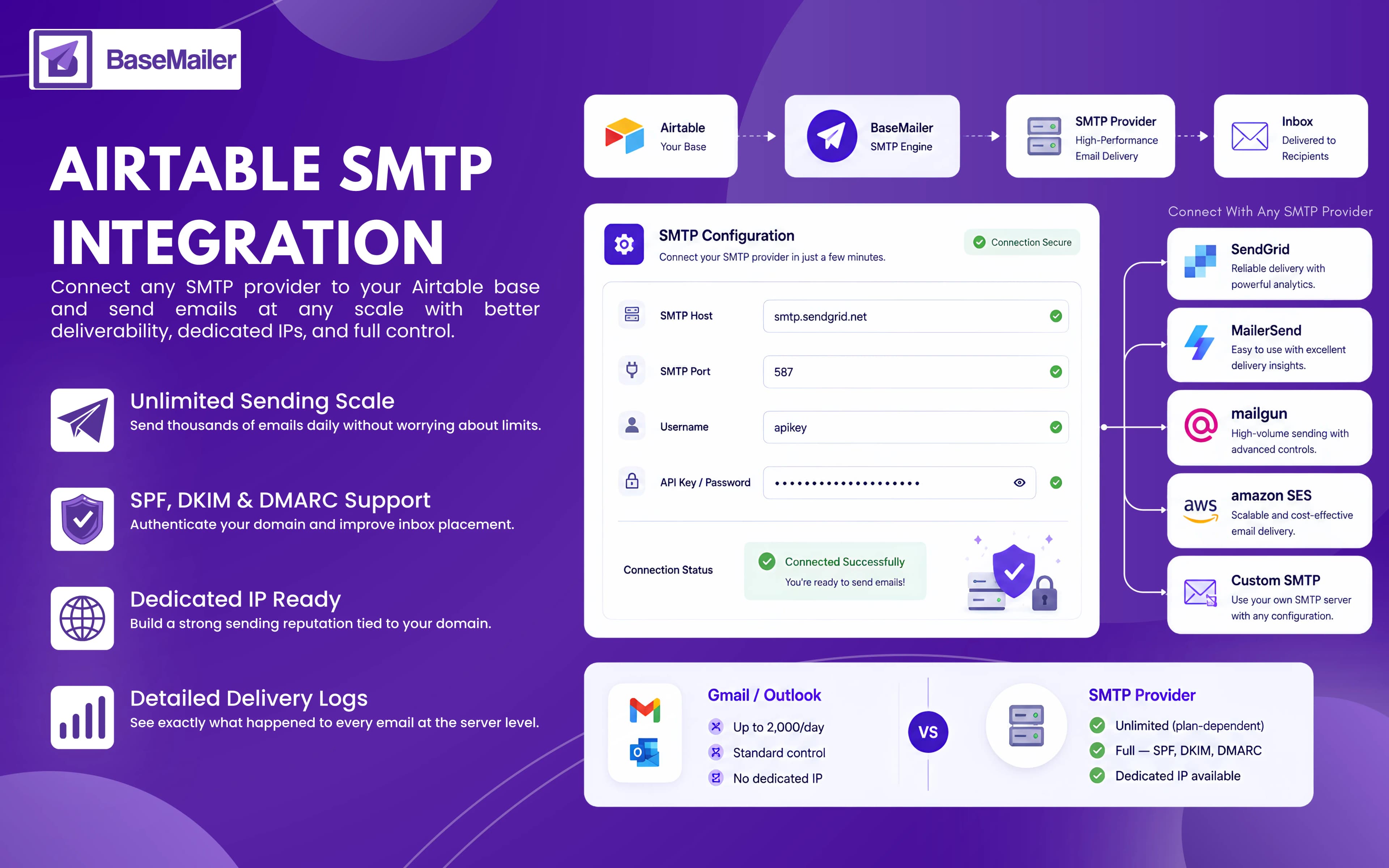
Everything You Need to Know About Airtable SMTP Integration!
SMTP (Simple Mail Transfer Protocol) is the standard communication protocol used to send emails across the Internet.
When you send an email from Gmail, Outlook, or any email client, SMTP is an underlying technology that routes the message to the recipient’s server.
For everyday emails, SMTP might not work for you, but when emails are sent in larger volumes, it is an amazing option.
As there are various features provided by SMTP that you capabilities that consumer email accounts simply cannot match:
- Daily higher sending limits: Sending thousands of emails without even thinking about their volume.
- Dedicated IP addresses: Build a sending reputation that is tied to your domain.
- Advanced deliverability tools: Authenticate your domain with SPF, DKIM, and DMARC to improve inbox placement.
- Detailed delivery logs: See exactly what happened to every email at the server level.
- Separate transactional and marketing sending: Keep business-critical emails on dedicated sending paths for better reliability.
How to Connect an SMTP Provider to Airtable with BaseMailer?
Setting up an Airtable SMTP integration takes just a few minutes. All you need is your SMTP credentials from your preferred provider:
- 1
Get Your SMTP Credentials
Log in to your SMTP provider and locate your SMTP settings. You'll typically need:
- SMTP Host (e.g. smtp.sendgrid.net)
- SMTP Port (usually 587 or 465)
- Username
- Password or API Key
Most providers list these under SMTP Settings, Credentials, or API Access.
- 2
Open BaseMailer Settings
Inside BaseMailer, open the Settings panel and select SMTP as your sending method.
- 3
Add Your Credentials
Enter your SMTP host, port, username, and password or API key. BaseMailer validates the connection automatically and confirms when it's ready to send.
- 4
Start Sending
Once connected, you can send email from Airtable SMTP while continuing to use all BaseMailer features, including:
- Drag-and-drop email builder
- Airtable personalization
- Real-time tracking
- Unsubscribe management
- Campaign analytics
Choose The SMTP Provider That Fits Your Needs!
BaseMailer works with virtually any SMTP service, making it easy to choose the provider that fits your needs:
Airtable SendGrid Integration
SendGrid is one of the most popular email delivery platforms, offering strong deliverability, detailed analytics, and scalable sending. It's an excellent choice for growing businesses that need reliable high-volume email delivery.
Airtable Mailersend Integration
Mailersend combines a clean user experience with competitive pricing and powerful delivery insights. It's ideal for teams that want dependable sending alongside detailed reporting.
Airtable Mailgun Integration
Mailgun is built for high-volume email sending and provides advanced delivery controls, dedicated IP options, and detailed send logs. It's a strong fit for technical teams and larger businesses.
Airtable Amazon SES
Amazon SES offers exceptional scalability at a low cost. Businesses already using AWS often choose SES for its affordability and enterprise-grade infrastructure.
Airtable Custom SMTP
Already have your own SMTP server? No problem. BaseMailer supports any standard SMTP service. If you have a host, port, username, and password, you can connect it as an Airtable custom SMTP provider.
Who Should Use Airtable SMTP Integration?
High-Volume Senders
Agencies, SaaS companies, and ecommerce businesses that send thousands of emails daily can scale far beyond Gmail and Outlook limits.
Deliverability-Focused Businesses
If email drives revenue, SMTP gives you the authentication, reputation control, and visibility needed to maximize inbox placement.
Airtable Power Users
Teams looking to replace standalone email platforms can use BaseMailer with an SMTP backend, keeping campaign management, contact data, tracking, and reporting inside Airtable.
Gmail / Outlook vs. SMTP - Which Should You Use?
Both are supported in BaseMailer. Here's a simple guide to help you choose the right sending method for your use case:
| Feature | Gmail / Outlook | SMTP Provider |
|---|---|---|
| Daily sending limit | Up to 2,000/day | Unlimited (plan-dependent) |
| Deliverability control | Standard | Full — SPF, DKIM, DMARC |
| Dedicated IP available | No | Yes (paid plans) |
| Setup complexity | 1-click OAuth | 5 min credential entry |
| Best for | Outreach & small lists | High volume & deliverability |
| Sends from your domain | Yes | Yes |
| Works with BaseMailer tracking | Yes | Yes |
Frequently Asked Questions!
Does BaseMailer work with any SMTP provider?
Do I need technical knowledge to set up Airtable SMTP integration?
Will I still get email tracking when sending through SMTP?
Which SMTP provider should I choose?
Can I switch between Gmail and SMTP sending?
Scale your sending with any SMTP provider
Connect SendGrid, Mailersend, Mailgun, Amazon SES, or your own server to Airtable in minutes — and keep the drag-and-drop builder, personalization, tracking, and analytics you already use.